Avoiding Common Pitfalls in Software Development (With a Real Rescue Case)

Software development is exciting, but it is also a serious investment, with many people each playing their own role. Even experienced teams fall into the same traps, and those traps cause delays, budget overruns and, in the worst case, a product nobody trusts anymore.
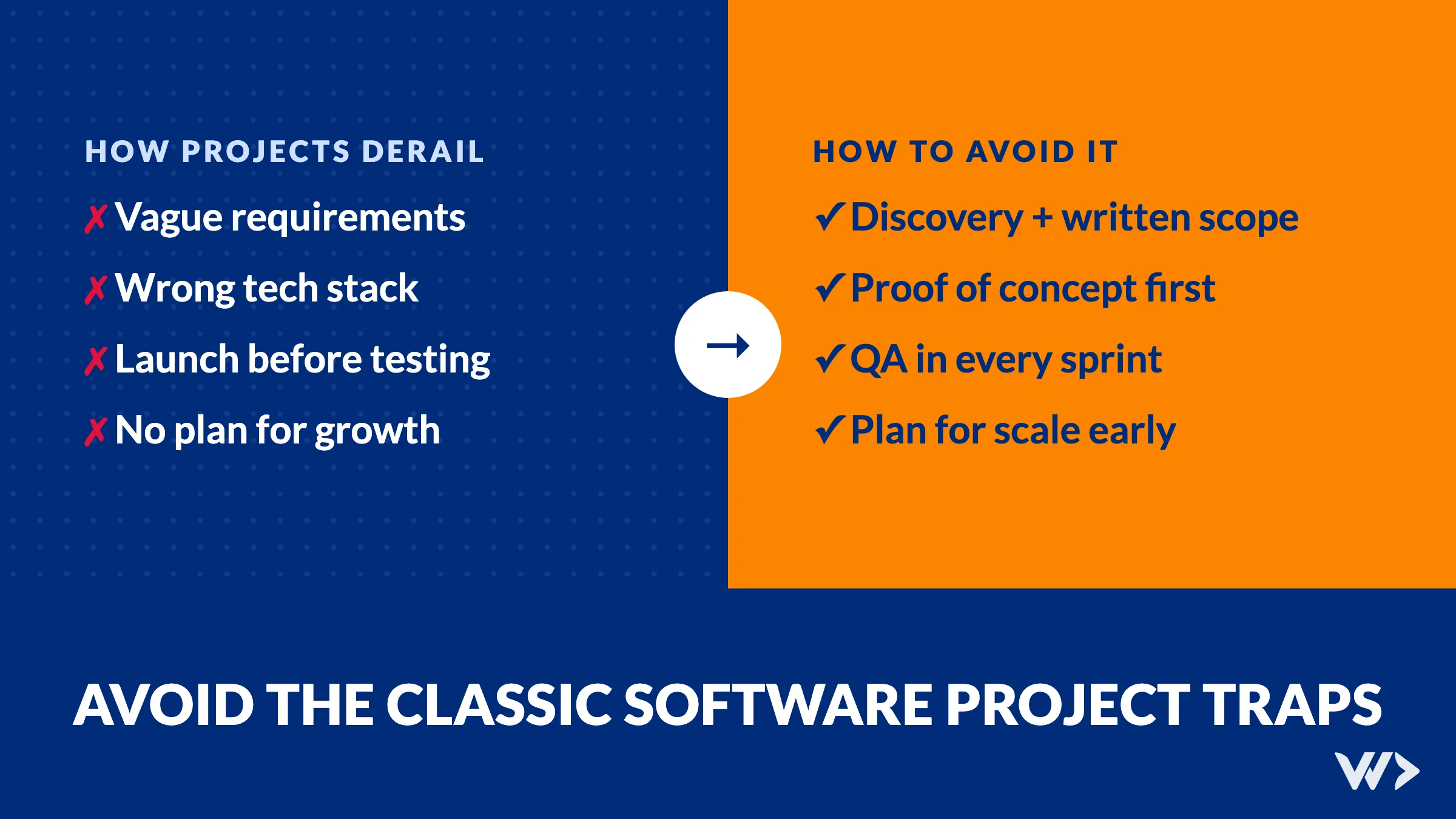
The short answer: most projects that go wrong fail on four things. A weak foundation, the wrong tech stack, launching before testing, and ignoring what happens when the product succeeds. Below we go through each one, show a real case from our own work, and end with a checklist you can use before your next project starts. Whether you are a business owner, a project manager or an engineer, your choices matter here.
The four pitfalls at a glance
| Pitfall | What you notice | How to avoid it |
|---|---|---|
| Poor foundation | Scope creep, endless rework, missed deadlines | Discovery phase, written scope, prioritised backlog |
| Wrong tech stack | Slow progress, odd bugs, expensive rewrites | Stack the team knows, proof of concept first |
| Launch before testing | Critical bugs right after go-live, users lose trust | QA in every sprint, user acceptance testing, staged releases |
| Ignoring scalability | Slow app, rising cloud bills, security risks as you grow | Plan for growth early, follow good engineering practice |

1. Poor project foundation
At the core of every project there is an idea: a feature that solves a problem some people do not even know they have yet. When we lay the foundation, we gather requirements and turn them into a short list of features that support that core idea.
Misunderstanding those requirements leads to scope creep and rework. What looked like a few weeks of simple work turns into a war zone of difficult decisions. Quality drops to meet deadlines, technical debt piles up, team members get demotivated and users get a slow, buggy product.
How to avoid it: do proper research in a discovery phase, validate designs and plans with the stakeholders, write the scope down on one page, and document decisions so there is less to disagree about later.
- As a stakeholder: stay involved, decide what you need first, ask for regular updates and give feedback quickly.
- As a project manager: set clear boundaries and realistic deadlines, respect them, and keep the client's confidence through open communication.

2. Choosing the wrong tech stack
Once there is a plan, a software architect decides which languages, frameworks, third-party APIs, testing tools and hosting to use. The stack should be neither over- nor under-engineered: flexible enough for the changes that will come, with enough built in to deliver on time.
Three mistakes come back again and again:
- A closed tool. Some platforms let you build fast without much code, until the first requirement the platform does not support. Then every change becomes a workaround.
- A stack the team does not know. Researching the right approach for every feature slows everything down, and inexperience lets bugs slip through code review.
- Poor support. A framework with few updates, thin documentation or a small talent pool becomes hard and expensive to maintain.
How to avoid it: weigh vendor lock-in, learning curve, security and long-term maintenance, and ask how the product will handle many more users. Build a small proof of concept before committing to a long plan.
- As a stakeholder: do not impose a stack on your team. Decide together, or pick a team that already has experience with the technology you want.
- As a project manager: explain the architecture to all stakeholders and staff the project with people who can confidently deliver in that stack.

3. Launching before testing
Under deadline pressure, teams sometimes declare they are ready to go live, and then discover critical issues after launch. Those issues suddenly become top priority, cost more to fix and leave users with a poor first impression.
The worst bugs are not the ones that crash the app. They are the ones that quietly show wrong data. People stop trusting the system, go back to their own spreadsheets, and the investment slowly loses its value.
How to avoid it: make testing part of every sprint, not a phase at the end. Test in more than one environment, run user acceptance testing with real users, and release in stages. Automate tests for the modules that change often or that the business depends on.
- As a stakeholder: ask for quality over quantity, be realistic about deadlines, take part in user acceptance testing and ask for test reports.
- As a project manager: build buffers into the timeline, agree with everyone on what "done" means, and hold review meetings where the team shows working software.
A real case: one feature broken for more than a year
Waterleau, a Belgian water treatment company, built an internal Capacity Planning Tool to give project managers and senior management a clear view of resources, budgets and project profitability. One of its most critical features, the SAP-integrated "freeze hours" function, had been malfunctioning for more than a year. The previous development partner could not solve it.
The effect was exactly what this article warns about. The data could no longer be trusted, planners went back to their own Excel files, and a significant investment was turning into an asset nobody used.
We stepped into a codebase written by several engineers with different standards and little documentation. Instead of applying another quick fix, we first mapped how the system really behaved. Then we rebuilt the freeze-hours module, refactored the affected code, and added data checks that flag any difference between SAP and what the tool shows. The complete solution was delivered within eight weeks, on time. Today we work with Waterleau on the next phase of the platform.
The lesson: almost every pitfall above was visible in one project. Unclear ownership of the code, no tests around a critical integration, and fixes that treated symptoms instead of the cause. Read the full story in our Waterleau case study.

4. Ignoring scalability
The product is live, congratulations. Then the user base grows. Some services keep up, others start to struggle, users notice the slowness and the first negative reviews come in. Success becomes a burden.
Preparing for success is as important as reducing risk. Cloud costs climb when the only answer is adding more servers. Security matters more as more people trust you with their data. And adding features gets harder in a rushed, messy codebase.
How to avoid it: think about growth from the start. Follow good practice when you write code, set up servers and store data, and choose an architecture that can grow with the product without over-engineering the first version.
- As a stakeholder: share your ambition. What does the best-case scenario look like, and which dream features are not needed for the first version?
- As a project manager: make sure coding guidelines are followed, run internal audits and keep the team focused on the long term.
Checklist before your next project starts
- Is the scope written down on one page, and did the people who will use the software confirm it?
- Is there one person on the client side who makes product decisions?
- Does the team have real experience with the chosen stack, or is there a proof of concept?
- Who owns the code, the hosting and the accounts from day one?
- Is testing planned in every sprint, with a clear definition of "done"?
- Do you know what happens when the number of users grows ten times?
- Is there a plan and a budget for maintenance after launch?
Conclusion
Every step of the development lifecycle matters. Skipping the processes that seem trivial creates technical debt that is expensive to fix, or in the worst case sinks the project. At We Do Dev Work we make mistakes too. Every team holds sprint retrospectives to bring them into the open and improve the way we work. We keep clients involved and informed, and we put maintainable software and long relationships ahead of artificial deadlines.
Is your project already off track? Read how we rescue software projects, or tell us what is going on. A free EngineeringScore audit is a quick first look at the health of a live site.
Related reading
Frequently asked questions
What are the most common pitfalls in software development?
Four come back in almost every troubled project: a poor foundation (unclear requirements), the wrong tech stack, launching before proper testing, and ignoring scalability.
How do you avoid scope creep and rework?
Start with a discovery phase: research the problem, write a one-page scope, validate designs with the people who will use the software, and keep a prioritised backlog. Every new request then becomes a conscious trade-off instead of silent extra work.
How do you choose the right tech stack?
Look at vendor lock-in, the learning curve for your team, security, community support and long-term maintainability. Then build a small proof of concept before committing to a long development plan.
Why is testing before launch so important?
Bugs found after launch become urgent and cost more to fix, and a feature that quietly shows wrong data destroys trust in the whole system. Test in several environments, run user acceptance testing and make QA part of every sprint.
What can you do when a project already went wrong?
Stop adding features, get an independent team to map how the system really behaves, and fix the cause instead of patching symptoms. At Waterleau we rebuilt a broken SAP-integrated module and delivered the complete fix within eight weeks.
Related articles
Supabase vs Firebase (2026): Which One for Your App?
Supabase or Firebase in 2026? A comparison from a team running three products on Supabase: data model, security, prices checked 19 Nov 2026, and how to choose.

Claude Fable 5.2 Tested on Two Real Bugs: Is It Worth It?
Claude Fable 5.2 launched on 9 Nov 2026. We gave it and Opus 5.5 two real bugs from our own site: both found the cause, Opus at less than half the cost.
WordPress Maintenance for Agencies: White-Label, 50+ Sites
How a design agency sells WordPress maintenance for 50+ client sites without a developer on staff: the work, the cost and what happens on patch day.