Why UX/UI Design Should Be Part Of A Business Strategy


“Hey, can you give this to your UX/UI team? So they make it look good.”
We hear that a lot. And yes, we do make things look good, but that’s just the surface. Because UX (User Experience) and UI (User Interface) are not about decorating screens. They’re about designing journeys.
Whether it’s a website, a webshop, an app, or software that runs your business, UX/UI decides if your users feel confident or confused, delighted or desperate. And those feelings directly affect your bottom line.
What is the difference between UX and UI?
UX is how the whole experience works: can someone find what they need, finish a task and feel sure about what happens next? UI is the visible layer of that experience: layout, typography, colour, buttons, states. UX decides what the screen needs to do. UI decides how it looks and responds. You need both, and the order matters: structure first, styling second.
Does UX/UI design pay off? What the evidence says
You will find bold ROI claims online, such as “every euro in UX returns 100 euros” or “UX lifts conversion by 300 to 400 percent”. We used some of these in an earlier version of this article. We could not trace them to a primary source we can open and check, so we removed them. Here is what we can point to.
- Checkout design. Baymard Institute’s research puts the average cart abandonment rate at 70.22% (an average of 50 studies). About 17% of shoppers who abandoned said the checkout was too long or complicated. Baymard estimates a large e-commerce site could gain about 35% in conversion rate from better checkout design alone, counting only issues it has confirmed are solvable.
- Speed is part of UX. In a Deloitte study published on web.dev, a 0.1 second improvement in mobile load time raised conversion rates by 8.4% on retail sites and 10.1% on travel sites, and retail customers spent 9.2% more.
Neither number is a promise for your business. They show where the money usually leaks: confusing checkouts, slow pages, unclear next steps. A fair way to judge UX work is to pick one funnel (enquiry form, checkout, sign-up), measure it before, and measure it again after.
UX/UI helps your business grow
When people enjoy using your site or app, they stay longer, buy more, and tell their friends. A smooth checkout is one of the clearest examples: every unnecessary field, forced account or surprise cost gives a customer a reason to leave. The principle is simple: make it easy, make it clear, make it human.
A great experience builds brand trust
Good UX/UI feels invisible. You don’t notice it working; you just feel comfortable. That’s what builds trust.
If a customer opens your app and immediately understands what to do, they’ll come back. If they struggle, they’ll leave. Probably for your competitor with a nicer interface and a faster loading time. UX/UI isn’t only about consistency of colors and buttons; it’s about creating the same emotional response every time someone interacts with your brand.
Investing early saves time and money
It is widely said that fixing a design mistake after development costs many times more than fixing it before. The exact multiplier (often quoted as 100x) comes from old, secondary sources, so don’t take the number literally. The direction, though, matches what we see in projects: changing a wireframe takes an afternoon, changing a built and tested feature takes a sprint. Thinking through the user flow before writing code is worth every minute.
UX/UI done right also keeps your dev team sane, with fewer revisions, fewer misunderstandings, and a product that simply works. It’s like testing your recipe before serving it to guests, instead of finding out too late that you forgot the salt. If you want to see how we start, read how I approach UX projects, from chaos to direction.
UX/UI aligns your whole team
Good design is a team sport. It connects marketing, development, and business goals under one shared focus: the user.
At We Do Dev Work, we bring our UX designers, UI specialists, and developers together from day one. That way, every decision, from the first wireframe to the final pixel, is based on data, user behaviour, and business logic, not personal taste. (Although our designers still have impeccable taste.)
UX/UI turns visitors into loyal users
First impressions matter. If your website or app is confusing or slow, users leave faster than a Thai when the rain starts. But with thoughtful UX/UI, clear navigation, mobile-friendly design, and fast performance, they stay.
Accessibility and performance are UX, not extras
Two things are often treated as a technical afterthought, and they are not.
- Performance. Google’s Core Web Vitals give clear targets for “good”, measured at the 75th percentile of page loads: Largest Contentful Paint within 2.5 seconds, Interaction to Next Paint of 200 ms or less, and Cumulative Layout Shift of 0.1 or less. A layout that jumps while a customer is about to tap a button is a UX bug.
- Accessibility. The current W3C standard is WCAG 2.2 (published October 2023, updated December 2024). Good contrast, visible focus states, large enough tap targets and clear labels help everyone, not only people with disabilities, and they are much cheaper to design in than to retrofit.
You can check both quickly: EngineeringScore runs a free audit of your website covering performance, accessibility, SEO, security and reliability, so you can see where the experience is breaking before you commission a redesign. For a slower site, also see the cost is not zero and SEO for developers.
How to tell if your UX needs work
- People visit but few enquire, sign up or buy.
- Support and sales keep answering the same “where do I find…” questions.
- Analytics show drop-offs on one step (a form, a checkout, a pricing page).
- Mobile results are clearly worse than desktop.
- Every new feature makes the product harder to explain.
If two or three apply, start with a small audit of one key journey, not a full redesign. Our website check is a quick way to get a first view, and pricing shows how we scope design and build work.
The heart of digital transformation
Every new digital project, whether it’s a webshop, CRM, or internal tool, lives or dies by how people interact with it. UX/UI is what turns technology into something approachable. It’s where code meets empathy.
At We Do Dev Work, we help businesses build digital products that feel human. Our team combines strategy, design, and development to make software that looks great, works smoothly, and makes sense for your users. See some of our projects.
In short
UX/UI isn’t just about making things pretty. It’s about making them work. For your users, for your team, and for your business.
Companies that treat UX/UI as a core business strategy don’t just get better design, they get better results. And if you’re ready to create something that both looks good and works beautifully, our team at We Do Dev Work is ready to help.
Sources
Frequently asked questions
What is the difference between UX and UI design?
UX covers how the whole experience works: finding things, completing tasks, feeling sure. UI is the visual layer: layout, type, colour, buttons and states.
Does good UX design increase conversion rates?
Often, especially in checkouts and forms. Baymard estimates a large e-commerce site could gain about 35% in conversion from better checkout design, but results depend on your starting point.
Why does UX matter for business strategy?
It decides whether visitors become customers, how much support you handle, and how much rework developers face. It affects revenue and cost, not just appearance.
Is it cheaper to do UX before development?
Yes. Changing a wireframe is far cheaper than changing built and tested features. Exact multipliers like 100x are not well sourced, so treat them as direction only.
Are accessibility and page speed part of UX?
Yes. Slow or shifting pages and poor contrast or focus states make products harder for everyone. Core Web Vitals and WCAG 2.2 give concrete targets.
How do I know if my website needs a UX redesign?
Look for low enquiry or purchase rates, drop-offs on one step, weak mobile results and repeated support questions. Audit one journey first before committing to a redesign.
Related articles
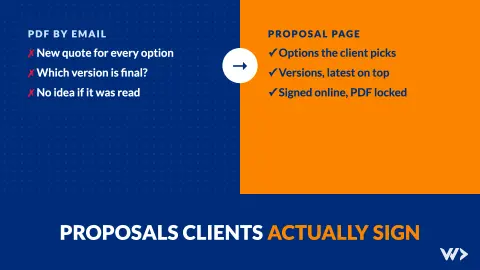
Proposals Clients Sign: Options, Versions and Online Signing
What we learned moving our proposals from PDFs to signed online pages: let clients choose options, keep versions, lock what was signed, know when it is read.

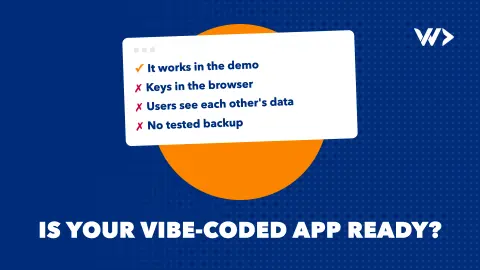
Is My Vibe-Coded Product Ready for Real Users? A Launch Checklist
Built your product with Lovable, Bolt, Cursor or Claude? Check secrets, data access, payments, backups, monitoring, privacy and code ownership before you launch.

SEO for a digital product: it starts long before you write your first article
SEO starts with the product: match search intent, research keywords before building, plan site structure, and use programmatic pages and AI search sensibly.