What Is an ERD (Entity-Relationship Diagram)? Definition, Example and Why to Start With One


In software development, one of the first steps in building a successful project is to properly design and structure your data. This often involves creating an Entity-Relationship Diagram (ERD), a powerful tool that helps developers and stakeholders visualize the relationships between different data elements in a system. But why is starting with an ERD so important? Let’s explore what an ERD is, why it matters, and how it can save you time, money, and headaches down the road.
The short answer: an ERD (Entity-Relationship Diagram) is a diagram of the things your software stores, such as customers, orders and products, the details each one holds, and how they relate: one customer has many orders, an order holds many products. You draw it before you build the database, because changing a box on paper takes minutes and changing a live database takes days.
What is an ERD (Entity-Relationship Diagram)?
An Entity-Relationship Diagram (ERD) is a visual representation of a system’s data structure. It shows how different entities (such as users, products, orders) relate to each other and what attributes they hold. ERDs are essential for designing databases and understanding the overall architecture of a project.
Key Components of an ERD:
Entities: Represent the main objects or concepts in your system (e.g., Customers, Orders, Products).
Attributes: Represent the properties or characteristics of an entity (e.g., Customer Name, Order Date).
Relationships: Show how entities are connected (e.g., A Customer can place multiple Orders).
By creating an ERD early in the project, you can map out the entire data structure, making it easier to spot potential issues before development begins.

Why is Starting with an ERD Important?
Starting your project with an ERD offers several key benefits:
1. Clarity and Communication
An ERD provides a clear, visual way to communicate the system’s data structure to all stakeholders, including developers, designers, and business owners. It ensures that everyone is on the same page before development starts.
Example: Imagine a project to build an e-commerce platform. Without an ERD, different team members might have different interpretations of how products, customers, and orders should interact. An ERD eliminates confusion by providing a single source of truth
2. Avoiding Costly Mistakes
One of the biggest risks in software development is discovering data structure issues late in the project. These issues can be expensive and time-consuming to fix. An ERD helps identify potential problems early, reducing the risk of costly mistakes.
Example: Without an ERD, you might realize halfway through development that your database can’t handle certain types of user queries. Fixing this after the system is built can require major changes. With an ERD, you can catch these issues before coding even begins.
3. Better Database Design
An ERD helps you design a more efficient and scalable database by clearly defining relationships between entities. It ensures that your database structure can handle future growth and changes.
Example: In a social media platform, understanding how users relate to posts, comments, and likes is critical. An ERD can help you optimize these relationships for performance and scalability.
4. Faster Development
When developers have a clear ERD to reference, they can work more efficiently. It reduces ambiguity and provides a roadmap for building the database and backend systems.
Example: Instead of wasting time figuring out how data should be structured during development, developers can focus on writing clean, efficient code.
5. Easier Maintenance and Scaling
A well-structured ERD makes it easier to maintain and scale your system over time. It provides a clear reference for future developers and helps ensure that updates and new features can be added without breaking existing functionality.
Example: If your project grows from handling 1,000 users to 100,000 users, a well-designed ERD ensures that your database can handle the increased load without significant rework.
Why Frontend Developers Should Pay Attention to the ERD
While ERDs are often associated with backend and database design, they are equally important for frontend developers. Understanding the data structure helps frontend developers:
Better Implementation of APIs: Knowing the relationships between entities helps frontend developers request the right data efficiently.
Improve State Management: Understanding how data is structured can inform how state is managed in frameworks like React, Angular, or Vue.
Enhance User Experience: A clear understanding of the data relationships can help frontend developers design more intuitive user interfaces.
Example: If a frontend developer knows that a single user can have multiple orders (a one-to-many relationship), they can design the UI to display these orders in a more user-friendly way.

Types of Relationships in ERDs
Understanding the different types of relationships in an ERD is crucial for designing a robust data model. Here are the main types of relationships and why they matter:
1. One-to-One Relationship
In a one-to-one relationship, each entity in the first set is associated with exactly one entity in the second set.
Example: A User entity might have a one-to-one relationship with a Profile entity, where each user has exactly one profile.
2. One-to-Many Relationship
In a one-to-many relationship, a single entity in the first set is associated with multiple entities in the second set.
Example: A Customer can place multiple Orders. This relationship is common in most database designs.
3. Many-to-Many Relationship
In a many-to-many relationship, entities in the first set can be associated with multiple entities in the second set, and vice versa.
Example: A Product can appear in multiple Orders, and an Order can contain multiple Products. This type of relationship often requires a junction table to handle the connections.
Understanding these relationships helps developers design databases that reflect real-world scenarios accurately.

A real example: what does a client actually sign?
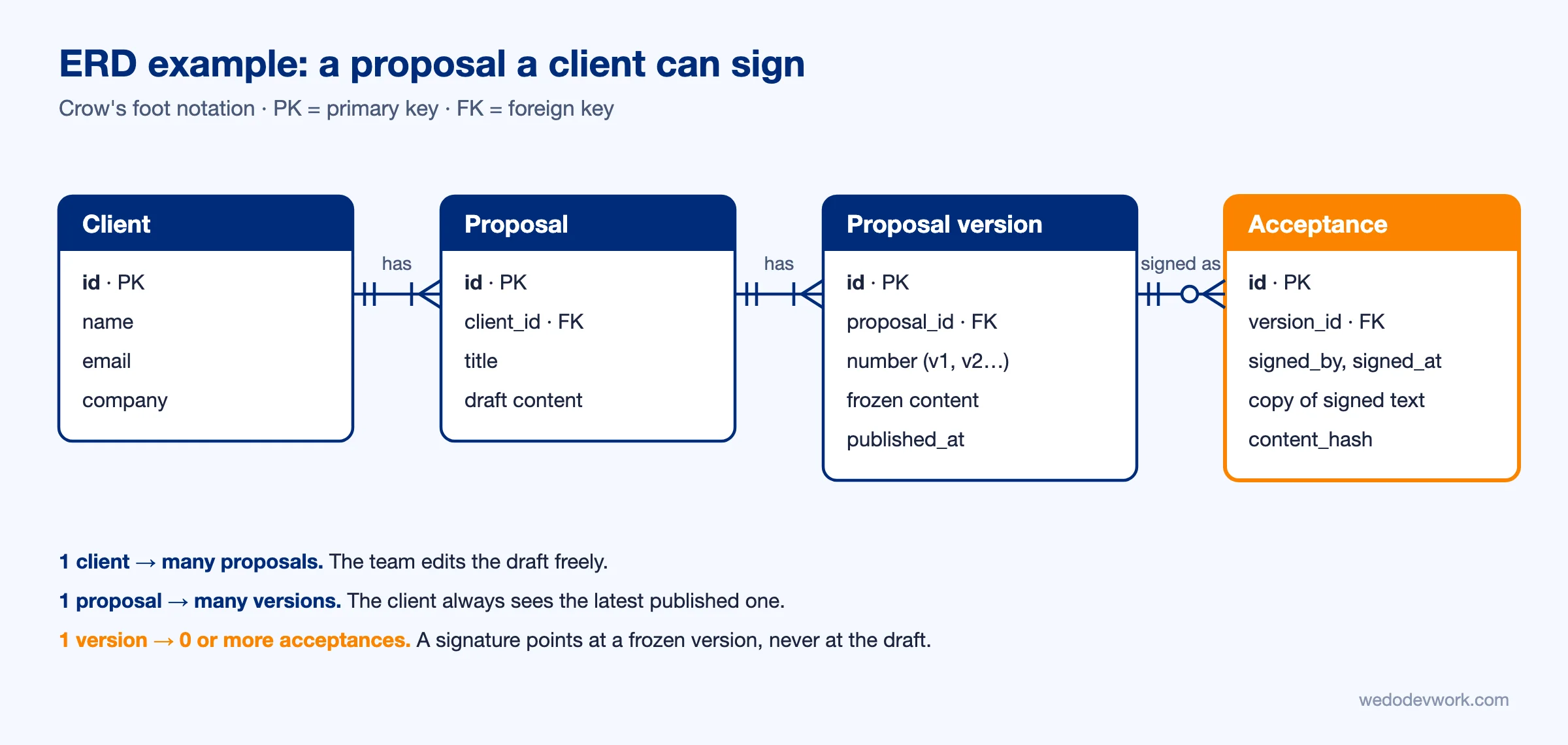
In October 2026 we added online signing to our own proposal system: a client opens the proposal link, reads it and signs. The ERD question that came up first was not about the screens. It was: what does a signature point to?
Our first model had one entity, Proposal, which our team edits until it is right. But a row that anyone on the team can edit is a bad thing to sign. If we fix a typo after the client signed, what did they agree to? And while we work on a new version, the client should keep seeing the old one.
So the diagram got three entities instead of one:
- Proposal: the working draft. Our team edits it freely, and every save keeps the previous content as a revision.
- Proposal version: a frozen copy, numbered v1, v2, v3… One proposal has many versions (one-to-many). The client's link always shows the latest published version, and our team sees the draft.
- Acceptance: who signed, when, and which version, with a full copy of what they saw and a hash of its content. A signed proposal is locked.
We did it in two steps. Signing went live on 6 October with the acceptance keeping its own full copy of the signed text. The next day versions followed, because the team needed to keep editing while clients saw the last published version. Because the acceptance had its own copy from day one, even the first signature, made before versions existed, still shows exactly what was signed.
Today the system holds 21 proposals with 114 saved revisions, 20 published versions (up to v5 for one client) and 8 signatures.
The lesson: the most useful ERD questions are business questions in disguise. "Can this change after someone agreed to it?" and "Who must keep seeing the old one?" decide your tables more than any tool does.
How to Create an ERD
Creating an ERD doesn’t have to be complicated. Here are some steps to get started:
Identify Entities: Determine the main objects in your system (e.g., Users, Products, Orders).
Define Attributes: List the key properties of each entity (e.g., User Name, Product Price, Order Date).
Establish Relationships: Identify how entities are connected (e.g., A User can place multiple Orders).
Use ERD Tools: Use tools like dbdiagram.io, Lucidchart, or Draw.io to create your diagram.
Tools for Creating ERDs
There are several tools available for creating ERDs, including:
dbdiagram.io: A simple and intuitive tool for creating ERDs online.
Lucidchart: A popular diagramming tool with ERD templates.
Draw.io: A free, open-source diagramming tool.
MySQL Workbench: A powerful tool for designing and managing databases.
When Should You Create an ERD?
An ERD should be created early in the project—ideally during the discovery or planning phase. It should be revisited and updated as the project evolves to ensure it remains accurate.
Tip: If you’re working with a software agency like We Do Dev Work, they will likely start by creating an ERD as part of the discovery phase to ensure your project is built on a solid foundation.
Conclusion
Starting your project with an ERD is one of the most important steps in software development. It provides clarity, reduces the risk of costly mistakes, improves database design, speeds up development, and makes maintenance easier. Whether you’re building an MVP or a large-scale application, taking the time to create an ERD will set your project up for success.
Partnering with a software agency like We Do Dev Work ensures that your project starts on the right foot, with a clear and well-structured data model that can support your business goals now and in the future.
Related reading
Frequently asked questions
What is an ERD in simple terms?
A diagram of the things your software stores (customers, orders, products), the details each one holds, and how they relate, for example one customer with many orders. It is drawn before the database is built.
What is an ERD?
An Entity-Relationship Diagram is a visual representation of a system's data structure. It shows how entities such as users, products and orders relate to each other and what attributes they hold.
Why should a project start with an ERD?
It gives everyone a shared view of the data, helps catch structural problems before coding starts, supports better database design, speeds up development and makes maintenance and scaling easier.
What types of relationships does an ERD show?
One-to-one, one-to-many and many-to-many. A user with one profile, a customer with many orders, and products appearing in many orders are the examples given.
How do you create an ERD?
Identify the entities, define their attributes, establish the relationships between them, and draw it with a tool such as dbdiagram.io, Lucidchart or Draw.io.
Why do frontend developers need to understand the ERD?
Knowing how data is related helps them request the right data through APIs, plan state management and design more intuitive interfaces.
Related articles
Supabase vs Firebase (2026): Which One for Your App?
Supabase or Firebase in 2026? A comparison from a team running three products on Supabase: data model, security, prices checked 19 Nov 2026, and how to choose.


Claude Fable 5.2 Tested on Two Real Bugs: Is It Worth It?
Claude Fable 5.2 launched on 9 Nov 2026. We gave it and Opus 5.5 two real bugs from our own site: both found the cause, Opus at less than half the cost.
Custom Web Application Development: Cost, Process and What Goes Wrong (2026)
What does a custom web application cost, how is it built and where does it go wrong? Day rates, a worked example and two real projects: Waterleau and RAS Security.